 WazzaBee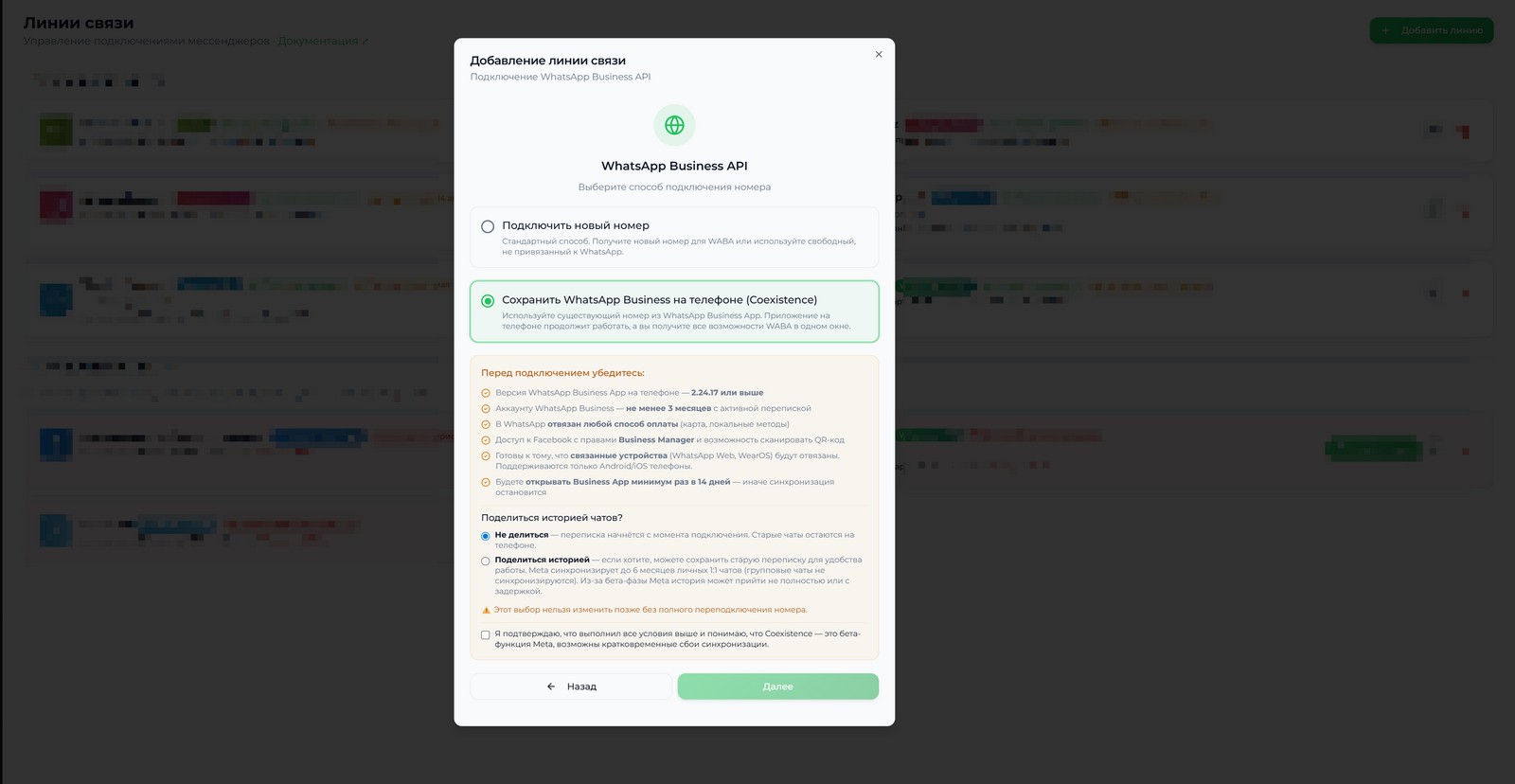
WhatsApp Coexistence: how to connect your business to a CRM without deleting the app
✦ Key takeaways
- •What WhatsApp Coexistence is, in simple terms
- •Why Coexistence is a revolution for businesses in Kazakhstan
- •How WhatsApp Coexistence actually works
- •Comparing three ways to connect WhatsApp
- •How to connect WhatsApp Coexistence in WazzaBee
In short, in 30 seconds: WhatsApp Coexistence is an official Meta feature that lets you connect your existing number from the WhatsApp Business app to a CRM system and API. Without deleting the app from your phone. Without changing your number. With the option to transfer up to 6 months of history. It solves the main pain point for businesses in Kazakhstan that have postponed moving to the official WhatsApp Business API for years out of fear of losing their customer base.
Before Coexistence launched, businesses had two separate ways to use WhatsApp together with a CRM. The first: a quick start via the app's QR code, with the risk of being blocked for bulk messaging. The second: the classic WhatsApp Business API connection, which required freeing up the number and deleting WhatsApp from the phone. Coexistence combines the advantages of both approaches and removes their main drawbacks.
What WhatsApp Coexistence is, in simple terms
WhatsApp Coexistence is a mode in which the same business number works simultaneously in the WhatsApp Business app on your phone and in the WhatsApp Cloud API on the side of a platform such as WazzaBee. Customer messages arrive in both interfaces at once: a manager can reply from the phone, while the business owner sees the same conversation in the CRM system.
Key features of Coexistence
The WhatsApp Business app stays on the phone and works as usual
The same phone number is kept: customers notice no changes
You can transfer up to 6 months of personal chat history to the CRM (optional)
Full access to marketing: bulk campaigns run exactly as described in our guide to official WhatsApp broadcasts via WABA
Full two-way CRM integration: all the principles from the guide to integrating a CRM with messengers apply here too
Assisted connection: we check your number before payment and guide you through every step
Coexistence is the most significant infrastructure news from Meta for small and medium businesses in the last three years. We see customers who postponed connecting the official API for years out of fear of losing their number finally moving their channels to a professional level.
Why Coexistence is a revolution for businesses in Kazakhstan
To understand the scale of the change, remember how businesses worked with WhatsApp before Coexistence. A typical picture: the owner of a cafe, beauty salon or online store has one work WhatsApp number that customers have been messaging for 5–7 years. That number holds thousands of conversations, thousands of contacts and orders. The number is printed on packaging, receipts, business cards, in Google Maps and on the website.
When such a business wanted to connect a CRM, broadcasts or a chatbot, it hit a dead end. Connecting WhatsApp via QR code gave a quick start, but the very first bulk WhatsApp broadcast to your own customer list got the number blocked: it violates Meta policies for non-WABA channels. And the classic WABA connection required freeing up the number, which in practice meant wiping WhatsApp from the phone and losing the managers' familiar workflow.
💡 Key insight: Coexistence removes the dilemma completely. The business gets an official Meta channel, broadcasts are allowed, analytics are in place, the risk of blocking is minimal, and nothing on the phone has to be broken.
Who needs WhatsApp Coexistence most
Small businesses with an active customer base: cafes, barbershops, salons, shops, delivery services. Customers have known the number for a long time, and it cannot be changed
Retail chains and service companies, where a manager physically replies from a phone on the shop floor and the owner wants to see all conversations in one window
Support teams of 2–10 people, where some staff work from a phone and some from a computer in the CRM
B2C marketers who want to run promotional campaigns but are afraid of losing the contacts on the phone
Manufacturing and wholesale companies, where the number appears on invoices, packaging and in B2B catalogs
How WhatsApp Coexistence actually works
Technically, Coexistence is a special link mode between the WhatsApp Business App and Meta's WhatsApp Cloud API. When a customer writes to the company number, the message lands in two places at once: in the app on the phone and in the cloud platform the CRM is connected to. Outgoing messages work the same way: messages sent from the CRM are delivered to the customer as a regular WhatsApp message.
For the business, this means complete freedom in choosing where to work. A manager on the floor replies from the phone just as before: no retraining. A marketer in the office runs segmented broadcasts through WazzaBee. The manager sees a summary of conversations and analytics in the admin panel. All three scenarios run in parallel, without conflicts or duplicate messages.
What is transferred to the CRM when you connect Coexistence
When Coexistence is activated, WazzaBee offers one of two ways to start:
Start from scratch: only new messages from the moment of connection get into the CRM. Old conversations stay only in the app on the phone. Suits those who want to separate "before" and "after" the CRM rollout
Transfer up to 6 months of history: Meta gives WazzaBee an archive of personal conversations from the last six months. The history appears in the CRM within a few hours: message texts, customer names, some media files. Suits those who want a complete correspondence base in one place
⚠️ Important to know in advance: the window for transferring history is only 24 hours after the first connection. This is a technical limitation of Meta. The choice of whether to transfer must be made before starting Coexistence onboarding. Once the window closes, old chats cannot be added.
Comparing three ways to connect WhatsApp
To see where Coexistence fits among the other options, let's compare three current ways to connect WhatsApp to business infrastructure:
Parameter | WhatsApp QR | WABA (classic) | Coexistence |
|---|---|---|---|
Connection time | 1–2 minutes | 10–15 minutes | 5–7 minutes |
App on the phone | Stays | Deleted | Stays |
Same number | Yes | With an interruption | Yes, without interruption |
Official broadcasts | Prohibited by Meta | Allowed | Allowed |
Risk of blocking | High | Low | Low |
Blue checkmark | No | Possible | Possible |
History transfer | No | No | Up to 6 months |
Daily limit | ~40 messages | 1000+ (Tier) | 1000+ (Tier) |
As the table shows, Coexistence covers all the weak spots of the earlier methods. This does not mean WhatsApp QR and classic WABA will disappear: they keep their niches. QR suits the very beginning and testing, WABA suits brand-new businesses that do not yet have a work number. But for most operating companies in Kazakhstan, Coexistence will be the best choice.
How to connect WhatsApp Coexistence in WazzaBee
WazzaBee was one of the first platforms in Kazakhstan to launch Coexistence. The mode is enabled on request through support: we first check your number against Meta's requirements, and after payment we open the connection in your dashboard: the wizard itself takes 5–7 minutes. We have put together a detailed walkthrough of every step in a separate article: how to connect the WhatsApp Business app via CoExistence.
Step 1: check the requirements
Before connecting, make sure your WhatsApp Business meets Meta's requirements:
WhatsApp Business App version 2.24.17 or later
The number is actively used in WhatsApp Business: Meta looks at the age of the number and the quality of conversations
The number is not connected to another WhatsApp API provider
You have a Facebook account to sign in to Meta Business
Step 2: sign in to WazzaBee and choose a channel
Register in WazzaBee if you do not have an account yet, and in the "Channels" section click "+ Add channel". Choose "WhatsApp", then "WABA (Official API)". On the mode selection screen, a new option will appear: "Keep WhatsApp Business on the phone (Coexistence)". That is the path you need.
Step 3: confirm the pre-flight checklist
The system will show a yellow block with requirements. Read each item carefully and tick "I confirm that I meet all the requirements". Only then will the "Next" button become active: this protects against Meta errors during onboarding.
Step 4: choose the history scenario
On the same screen, choose one of two options: whether to transfer chat history for the last 6 months. This is an important decision: it cannot be changed after connection, because Meta's transfer window is open for only 24 hours.
Step 5: sign in to Facebook and choose the number
Click "Sign in with Facebook". A new tab with Meta authorization will open. Sign in to your Facebook, choose your WhatsApp Business Account, confirm consent to Coexistence and return to WazzaBee. A list of your numbers will appear on the screen: choose the one you need. In 5–10 seconds the link will be set up, and the channel will appear in the list of channels with the "Active" status.
The full step-by-step guide with screenshots of every screen is available in the official documentation on connecting WhatsApp Coexistence, which covers all the details and typical onboarding errors.
After connecting Coexistence, it is important to open WhatsApp Business on the phone at least once every 14 days. This is a technical requirement from Meta for keeping the link with the Cloud API. If the app has not been opened for more than two weeks, the connection may break and you will have to reconnect.
What a business gets after connecting Coexistence via WazzaBee
Right after Coexistence is activated in WazzaBee, the full set of tools for professional work with the WhatsApp Business API becomes available:
A single window for all chats: messages from WhatsApp, Telegram, Instagram Direct, Facebook Messenger and OLX in one dashboard
Two-way integration with amoCRM and Bitrix24: we have a separate article on integrating Bitrix24 with WhatsApp in 15 minutes, where all the principles also apply to Coexistence channels
Official broadcasts via HSM templates: bulk messaging to customer segments with legitimate marketing
Chatbots and automation: auto-replies, routing between operators, scenarios like "greeting → menu → handoff to an operator"
Analytics and reports: conversation statistics, response speed, operator workload, broadcast conversion
REST API for your own integrations: embedding chats into your products and custom CRM systems
WhatsApp Coexistence pricing in WazzaBee
Coexistence is an operating mode of a WABA channel, so it is billed like a regular WhatsApp Business API. WazzaBee charges no extra fees for the Coexistence mode itself. Plans start at $68/month for small business teams and depend on the number of conversations and the set of connected channels. A detailed breakdown of billing, channel activation and payment for legal entities is in the channel activation and payment section of the documentation.
In addition, the cost of a conversation is paid at Meta's rates: this is the standard fee for a messaging session with a customer, the same for all WABA platforms worldwide.
💰 Tip: to estimate the exact cost before registering, open the pricing calculator in your dashboard. It takes into account the number of conversations, the type of business and the selected channels. You can start with a trial period and assess the load before paying for the full plan.
Bottom line: it's time to connect WhatsApp Coexistence
WhatsApp Coexistence is an infrastructure step that changes the rules of the game for small and medium businesses in Kazakhstan. For the first time in many years, it is possible to connect the official WhatsApp Business API without the risk of losing your number, contacts or work history. For companies that have postponed moving to a professional channel for years because of these fears, there is no longer any reason to wait.
🚀 Connect Coexistence today
15 minutes to connect. Without deleting the app from your phone. Without losing history. Without programmers.
Free registration · Trial period · Support in Kazakh, Russian and English
FAQ

An omnichannel platform that connects messengers to your CRM. We link WhatsApp, Telegram, Instagram and 5 more channels to your business in Kazakhstan.
You may also like
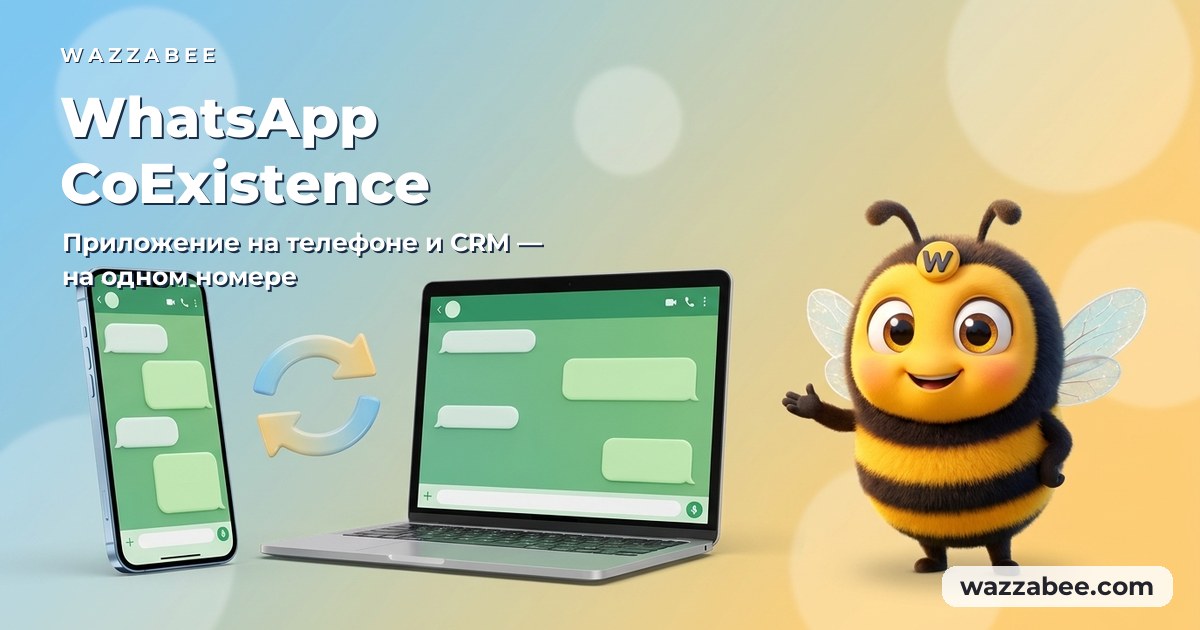
WhatsApp CoExistence: connect the WhatsApp Business app to your CRM without losing the number or the history
CoExistence is Meta's official mode: the WhatsApp Business app stays on the phone, the number stays the same, and broadcasts, Meta templates and your CRM run through the API. Requirements, step-by-step setup and what it costs a business in Kazakhstan.
How to choose a WhatsApp Business API provider in Kazakhstan: 2026 guide and a 10-question checklist
How to choose a WhatsApp Business API provider in Kazakhstan: provider types, what the real WABA price is made of, a 10-question checklist before paying, a monthly cost example and five places where companies overpay.
How to reduce the risk of a WhatsApp Business ban during bulk messaging
What to choose for bulk messaging, why WhatsApp bans numbers for broadcasts and which Meta rules actually reduce the risk. Official broadcast pricing and how to check the results.