 WazzaBee
Chatbots
for free
Build a bot with a menu and buttons for WhatsApp, Telegram, Instagram and Messenger. Customers find prices, services and your address on their own, and a manager steps in only when really needed.
- The builder comes with the channel, no extra fee for the bot
- No developer and no Meta approval
Try the bot right now
Our own bot is built in the same builder you get.
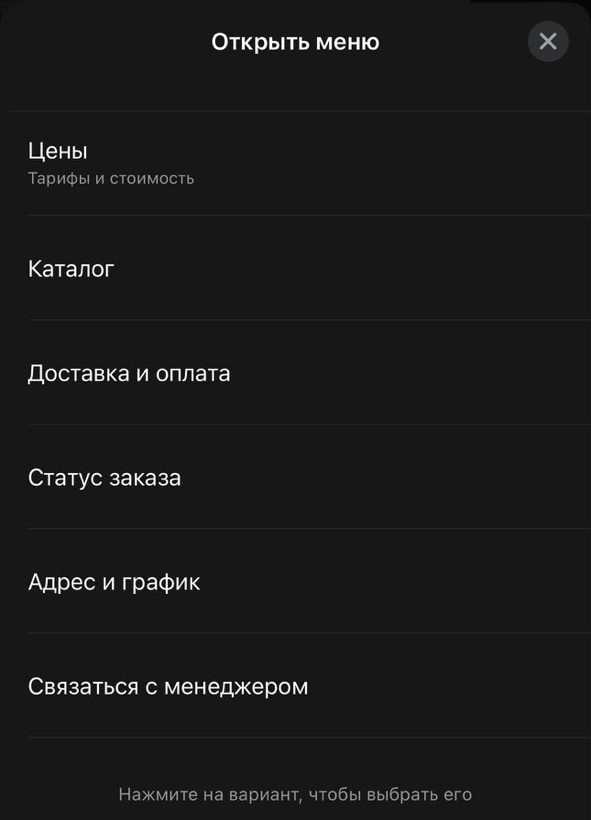
Send the word «Меню» in WhatsApp to +7 777 261 11 16
Tap «Открыть меню» and pick any item
Get an answer, a PDF, a video or a manager right in the chat
Our bot answers in Russian. The word «Меню» is filled in for you, just tap Send.
What customers see and what you see in the dashboard
A minute and a half: the bot in WhatsApp through a customer's eyes and building it on the canvas.
What the bot can do
Every message type WhatsApp allows in a reply to a customer, plus actions inside WazzaBee.
List menu
An «Open menu» button with up to 10 items and descriptions behind it. An item leads to an answer or to another menu of any depth.
Buttons under a message
Up to 3 buttons right under the text. You can add an image, a video or a PDF on top.
Price list, catalog and video
The bot sends a price list, a catalog, a commercial offer or a video about your service as a file.
Call a manager
The chat gets a «Waiting for a manager» label and the owner gets a push. The bot goes quiet.
Tags and CRM deals
The bot adds a tag like «Hot lead» and creates a CRM deal at the right stage or moves an open one.
Greeting by name
{{имя}} inserts the customer's WhatsApp name. Your own variables, such as an address, update in every message at once.
Link button
One button that opens your website, online booking or payment page.
Location request
A «Send location» button for delivery, a technician visit or a taxi.
When the bot starts
Pick one way or several at once.
On a keyword
A customer writes «Menu», «Start» or «Prices». The word can also be caught inside a phrase: «show me the menu, please».
On the first message
The bot greets every new customer. The first-message auto-reply is skipped then, so there are no two answers.
From ads and QR codes
Put a wa.me link with the start word into an ad or on a business card, and the customer lands straight in the menu.
Manually from the chat
A manager taps «Send menu» in the chat and the customer gets the first message of the chosen bot.
A visual builder, no code
The bot is built right in the dashboard: Templates → Menu bots.
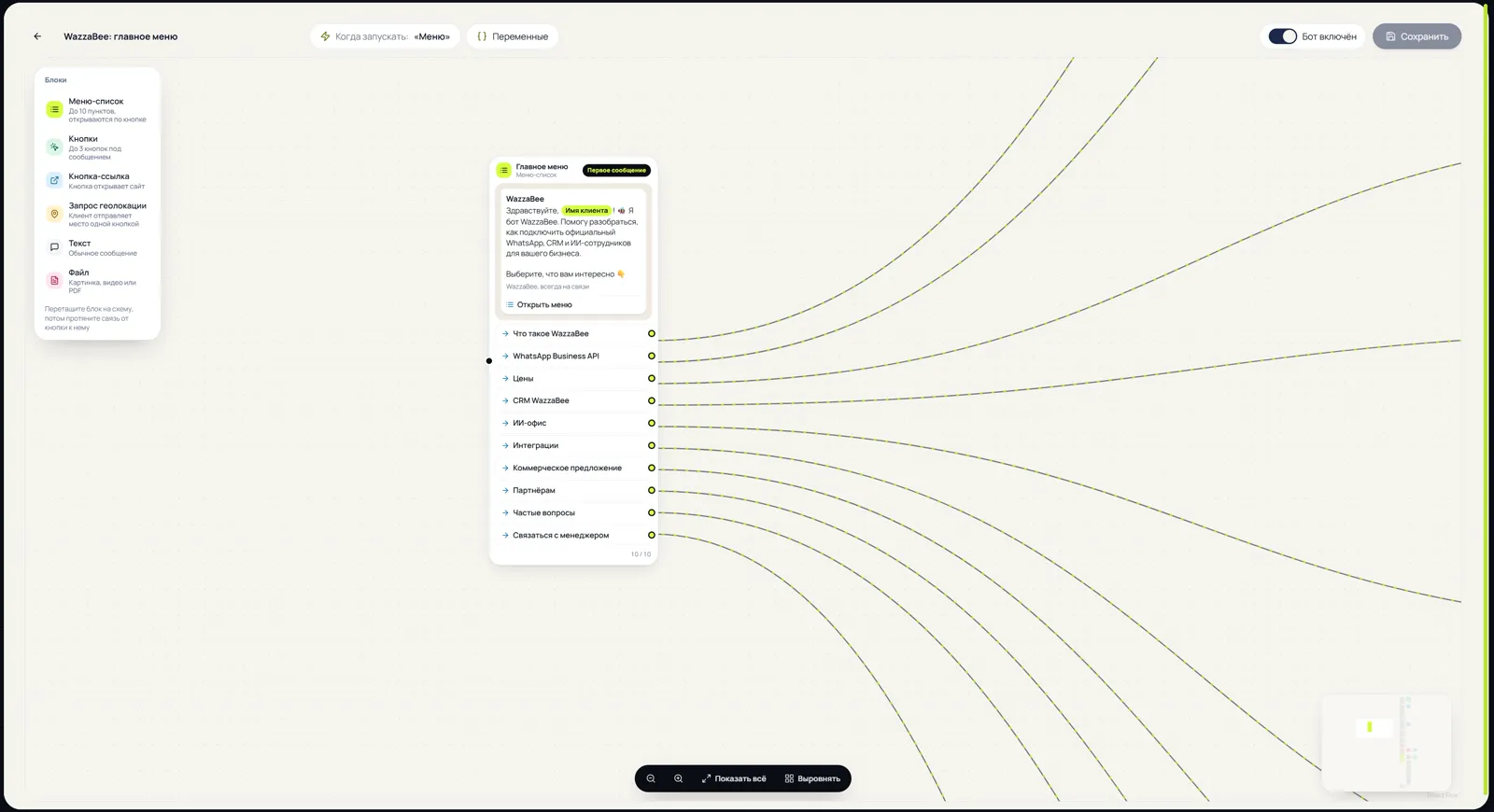
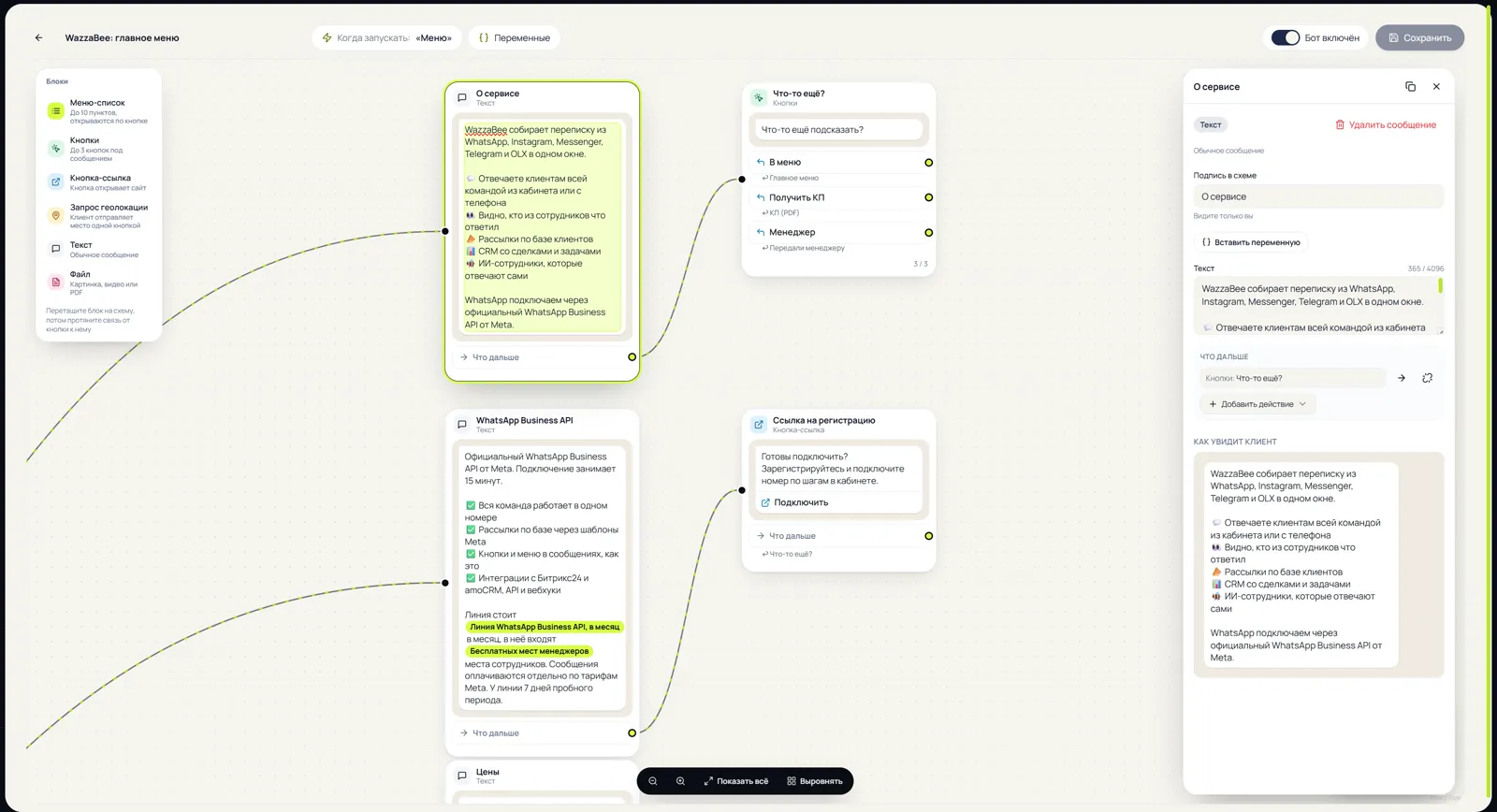
The first message is on top, and under every item is what the bot will reply. Drag a block from the panel and draw a link from a button to an answer.
On the right are the settings of the selected message and a live WhatsApp-style preview.
Every field has a character counter based on WhatsApp limits. A message with an error is highlighted, and such a bot cannot be switched on.
On a phone the same canvas opens as a list, and settings slide up from the bottom.
The bot list shows how many times each bot was started and how many times items were picked.
One builder, four messengers
The bot works on the channel you attach it to.
List menu, buttons, files, a link button and location. The bot replies to a customer's message within 24 hours, no template or Meta approval needed.
The menu arrives as buttons under the message. Telegram has no 24-hour limit.
The menu arrives as quick replies, up to 13 buttons. Buttons are visible in the mobile app.
The same quick replies as in Instagram. Buttons disappear after the next message.
What businesses hand over to the bot
The repeat questions a manager answers over and over again.
Service prices, an online booking link, the address with a map and a call to the administrator.
Departments and doctors, test preparation as a file, booking through the administrator.
A PDF catalog, delivery and return terms, order status through a manager.
The menu, the delivery area, a location request and a CRM deal for every order.
Programs, schedule, prices and sign-up for a trial lesson.
A PDF offer, case studies, FAQ and passing the lead to a manager with a tag.
The bot and the AI employee work together
Buttons cover typical questions, and the bee picks up free-form ones.
The bot answers first
While the customer taps menu items, the AI employee stays quiet and does not interrupt.
A question in plain text
If the customer types their own question instead of picking an item, the bee answers, if it is connected to the channel.
No customer is lost
Bot messages do not remove the «Waiting for a manager» label. Only a reply from a real employee does.
How much it costs
You do not pay for the bot. The builder comes with every connected channel.
Every channel has a 7-day trial period: you can build and test the bot before paying.
FAQ
Is the chatbot really free?
Yes. The chatbot builder comes with any connected WazzaBee channel, with no separate fee for the bot or for the number of bots. You only pay for the channel itself per plan, and in WhatsApp bot replies are charged the same way as manager replies.
Do I need a developer?
No. The bot is built on a canvas in the dashboard: drag a block, type the text, draw a link from a button to an answer. WhatsApp limits are shown as you type.
Do I need Meta approval or a template?
No. Menus and buttons are sent in reply to a customer's message, within 24 hours of it. A Meta-approved template is only needed for broadcasts and for writing to a customer first.
Can the bot message a customer first?
Not in WhatsApp: this is WhatsApp's own rule. To write first, use a template with buttons in the Templates section, and when the customer replies, the bot greets them.
Which messengers does the bot work in?
WhatsApp Business API, Telegram bot, Instagram and Messenger. The bot canvas is the same, but Instagram and Messenger have no location request, and buttons arrive as quick replies.
How many items can a menu have?
A WhatsApp list menu holds up to 10 items, and a button message up to 3 buttons. Depth is unlimited: an item can open another menu, and that one can open yet another.
How does the bot get along with the AI employee?
The bot answers first while the customer taps items. If the customer types their own question, the bee answers, if it is connected to that channel. The AI office is connected separately.
What happens if a customer asks for a manager?
The chat gets a «Waiting for a manager» label with the reason, the dashboard owner gets a push, and the bot goes quiet in that chat. The label is removed by an employee's reply.
Can I send menus from my own system?
Yes, the same menus and buttons can be sent through the WazzaBee API without a template. Instructions are in the API section of the documentation.
Build your bot today
Sign up, connect a channel and open Templates → Menu bots. The bot is free.