 WazzaBee
Linked WhatsApp accounts and Messaging accounts: what Meta changed in 2026
✦ Key takeaways
- •What changed in WhatsApp Business accounts in 2026?
- •How is a WhatsApp account different from a Messaging account?
- •What are Linked WhatsApp accounts?
- •How do you link a number in a set of Linked WhatsApp accounts?
- •What happens to HSM templates under the new model?
Linked WhatsApp accounts appeared in Meta Business Suite in autumn 2026 together with the new account model. A phone number now lives in a separate WhatsApp account, while templates and billing sit in a Messaging account. Linked WhatsApp accounts group several numbers into one set: you can share the whole set with a partner and pay for it with a single payment method.
Below we explain what has changed, what it means for templates, billing and switching providers, and what to check in your Meta account right now.
Many businesses opened their Meta settings and did not recognise them: instead of the familiar WhatsApp Business account there are two sections, WhatsApp accounts and Messaging accounts, and a number has a new tab, Linked WhatsApp accounts. Questions follow: where did the templates go after reconnecting, why does the old provider still see the number, and what is the money being charged for. This is not a glitch: Meta has changed how the platform itself works.
What changed in WhatsApp Business accounts in 2026?
Meta split the former WhatsApp Business account (WABA) into two parts. Previously it held everything at once: the number, templates, billing, partner access and analytics. That is why a number was firmly tied to one provider and had to be migrated when you switched providers.
Now the number and the business profile are stored in a WhatsApp account, while templates, billing and analytics are in a Messaging account. According to Meta's documentation, the migration of businesses to the new model began on 23 September 2026 and was expected to cover everyone by mid-October. If you still see the old settings, your business has not been migrated yet: the interface changes only after migration.
If you already send messages, nothing breaks. Numbers, tokens, templates and message prices work as before, and the former WABA ID now simply means the Messaging account ID.
How is a WhatsApp account different from a Messaging account?
A WhatsApp account defines who you are to the customer: the number, the name and the profile. A Messaging account defines which provider sends the messages and who pays for them. One number can have several Messaging accounts, one for each connected provider.
| What | WhatsApp account | Messaging account |
|---|---|---|
| Phone number | Yes, one number per account | No |
| Profile, display name, catalog | Yes | No |
| Chat history and number quality rating | Yes | No |
| HSM templates | No | Yes, each has its own |
| Payment method and message invoices | No | Yes |
| Sending analytics | No | Yes |
| Owned by | Always your business | You or the provider you work through |
The main consequence: the number no longer belongs to the provider. It always stays with your company, and providers only get access to it.
What are Linked WhatsApp accounts?
It is a set of several WhatsApp accounts, that is, several numbers of one company. The set has a primary number and the numbers linked to it. This is handy when a business has several numbers: branches, sales and support, numbers for different countries.
Each number in the set works independently:
- sends messages independently of the others;
- has its own display name;
- has its own messaging limits.
With the set as a whole you can do three things:
- give a partner or employees access to all numbers in one action;
- pay for all numbers in the set with one payment method;
- unlink a number from the set at any time.
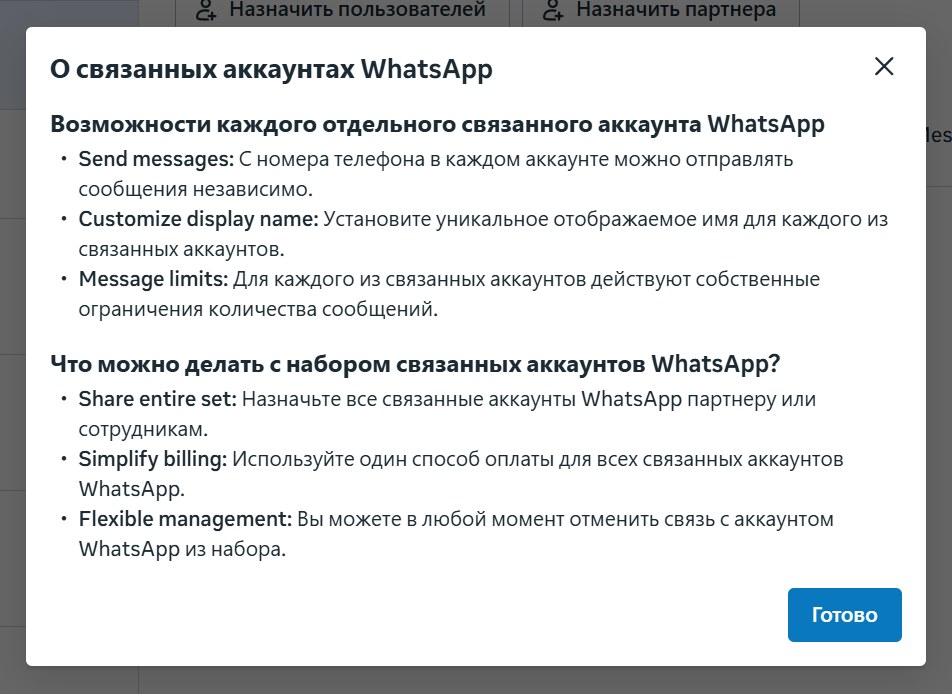
According to Meta's documentation, one business portfolio can have up to 20 sets. A set initially allows 2 registered numbers, and the limit can later be raised to 20.
How do you link a number in a set of Linked WhatsApp accounts?
A number is linked in Meta Business Suite in a few minutes. You will need access to the SIM card of the new number to receive the verification code. The steps are:
- Open business.facebook.com, then "Settings", "Accounts", "WhatsApp accounts".
- Select the primary number and go to the "Linked WhatsApp accounts" tab.
- Click "Link WhatsApp account".
- At the "Information" step, upload a profile photo, enter the display name and choose the business category.
- At the "Phone number" step, enter the new number.
- At the "Verification" step, enter the code sent to this number.
The most common mistake at the first step is a display name containing a website address, for example "Company.kz". Meta explicitly warns that such a name will be rejected. The name must match the company name, without website addresses, emojis, extra punctuation or trademark symbols.
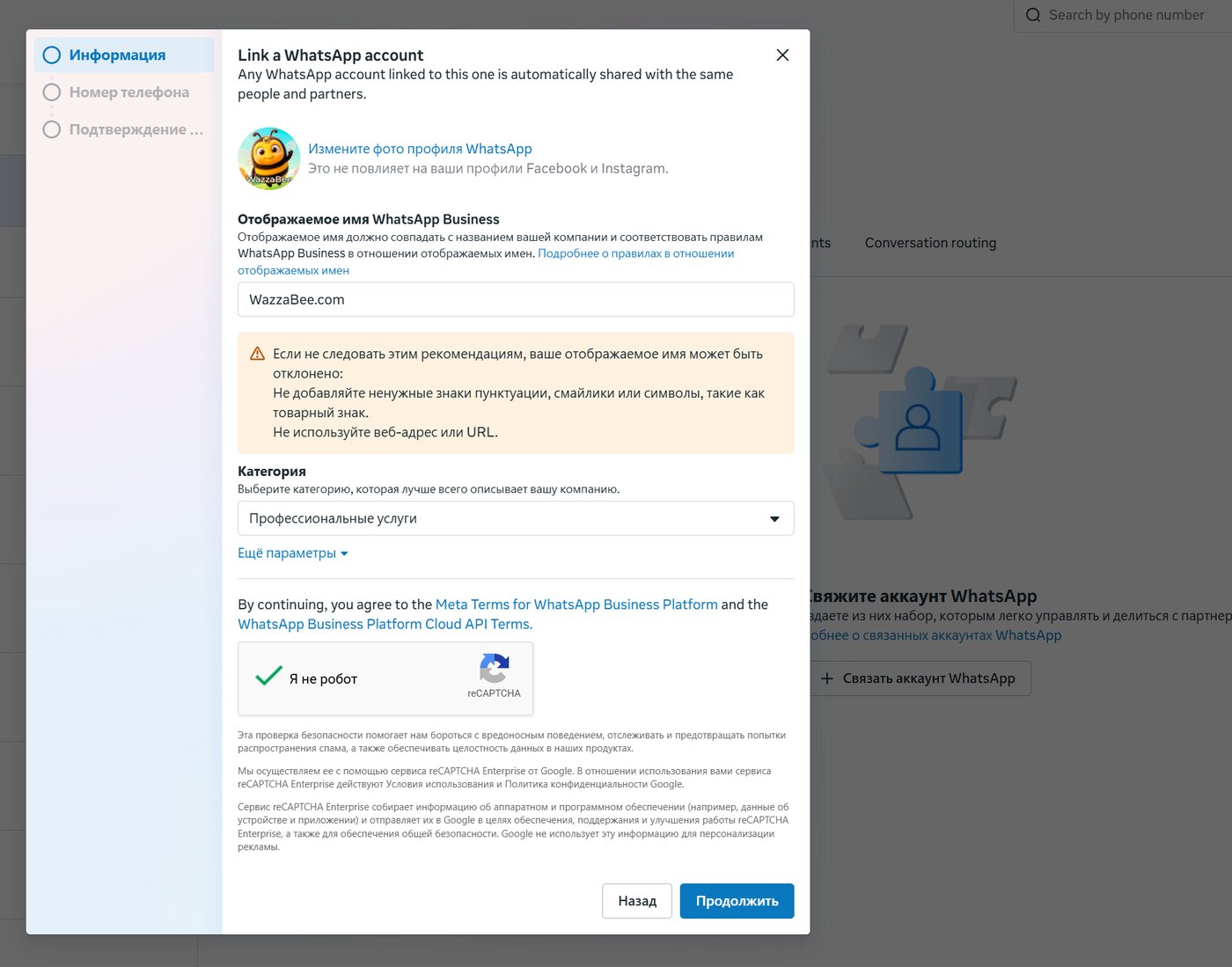
There are restrictions. You can link only numbers within one business portfolio. A number that is already shared with a partner or has its own Messaging accounts cannot be linked, and Business Suite will show the reason. The feature is also being rolled out gradually: if you do not see the tab, it has not been enabled for you yet.
What happens to HSM templates under the new model?
Templates belong to the Messaging account in which they were created and are not visible to other providers. If you connect a number to a new provider, your templates will not appear there automatically: you need to create them again or migrate them.
Not everything can be migrated. Meta copies only approved templates with green or not yet rated quality, and only between accounts of the same business. A migrated template's quality rating is reset and takes roughly 2–4 weeks to recover. So it is better not to launch a large broadcast right after switching providers: start with small volumes.
The template limit is also counted per Messaging account: 250 templates until the business completes verification in Meta, and up to 6 000 after verification and display name approval. We explained how templates work and when you need them in our article on WhatsApp HSM templates.
How are WhatsApp messages paid for now?
Billing is tied to each Messaging account separately. The charge for a message is taken from the account of the provider that sent it. If a Messaging account has no payment method, paid messages will not go through it, even if the number itself is fine.
The practical takeaway: if a number is connected to two providers, each one issues its own invoices. For example, one sends broadcasts while agents reply through the other, and their costs do not mix. In WazzaBee, messages are paid from the line balance in the dashboard, and the prices for each message category are listed in our article on WhatsApp pricing from 1 October 2026.
Which limits are shared by all providers on one number?
If a number is connected to several providers, some limits are shared between them. This matters when broadcasts and conversations run through different systems.
- Sending speed is counted per number, and providers share it.
- The limit of unique recipients in 24 hours is counted per business portfolio and is shared too.
- The quality rating stays with the number. If a broadcast sent through one provider gets customer complaints, the quality of the whole number drops, and this hits all providers.
How can you switch WhatsApp Business API providers without losing your number?
Under the new model, a number is no longer migrated from one provider to another. You share your WhatsApp account with the new provider, Meta automatically creates a separate Messaging account for it, the number stays where it is, and conversations with customers are not interrupted. One WhatsApp account can be shared with up to five partners.
An important point: adding a new provider does not disconnect the old one. Until you remove the previous connection yourself, it can keep sending messages from your number. Stopping payments to the old provider does not mean it has lost access. All connections are visible in the Messaging accounts section.
With WazzaBee, connecting official WhatsApp takes 15 minutes: you log in with Facebook, choose your business and number, and the line is ready. After connecting, create the templates you need in the "Templates" section, and if you are unsure which provider to choose, see our checklist of 10 questions to ask a provider.
What should you check in Meta Business Suite right now?
Five minutes in the settings will save you from unexpected charges and missing templates. Go through the list:
- Open "Settings", "Accounts" and check whether there are WhatsApp accounts and Messaging accounts sections. If there are, your business is already on the new model.
- In Messaging accounts, find the connections of providers you no longer use and remove them.
- Check that every active Messaging account has a payment method or a balance with the provider.
- Before moving to a new provider, save a list of your templates so you can quickly create them again.
- Check the display name of each number: no website address and no emojis.
If the two-step verification PIN tab has disappeared in WhatsApp Manager, that is also part of the changes, not a hack. Meta is gradually removing this PIN from Cloud API numbers, while confirming number ownership with an SMS code remains.
What will Meta change next?
The migration runs in three phases. The first has already taken place in the second half of 2026 and is almost unnoticeable for businesses. The second is planned for the first half of 2027: a new API version will appear with separate IDs for WhatsApp accounts. The third, mandatory phase is scheduled for the first half of 2028.
The last two phases mainly concern the providers you work through: they need to update their integration. For example, by 31 December 2026 providers must switch from the paid_messaging_account_id parameter to messaging_account_id. Businesses on WazzaBee do not need to do anything for this.
Sources: Meta documentation on the new account model, WhatsApp accounts and Messaging accounts, onboarding changes. Meta warns that details may still change.
FAQ

An omnichannel platform that connects messengers to your CRM. We link WhatsApp, Telegram, Instagram and 5 more channels to your business in Kazakhstan.
You may also like
WhatsApp CoExistence: connect the WhatsApp Business app to your CRM without losing the number or the history
CoExistence is Meta's official mode: the WhatsApp Business app stays on the phone, the number stays the same, and broadcasts, Meta templates and your CRM run through the API. Requirements, step-by-step setup and what it costs a business in Kazakhstan.
MM Lite for WhatsApp (Marketing Messages Lite): why to enable it and how to set it up for WABA broadcasts
MM Lite (Marketing Messages Lite API) increases WhatsApp broadcast deliverability by up to 9% with no extra fees and no template rework. We explain why to enable MM Lite for WABA and how to activate it step by step.
WhatsApp HSM templates in WazzaBee: reaching customers outside the 24-hour window
How clinics, medical centers and service companies use WhatsApp HSM templates in WazzaBee: lab results sent as a link, reminders, invoices, Bitrix24 and CRM robots.